Stay connected. Stay involved. Support each other.
Guardian Sarah helps your family stay connected to an aging loved one. Sarah — an AI voice, not a real person — calls them up to three times a day on the phone they already own. You read a few warm sentences about how it went, see what they asked for, and their stories grow into a life story the family keeps.
One price, one product. What it costs.
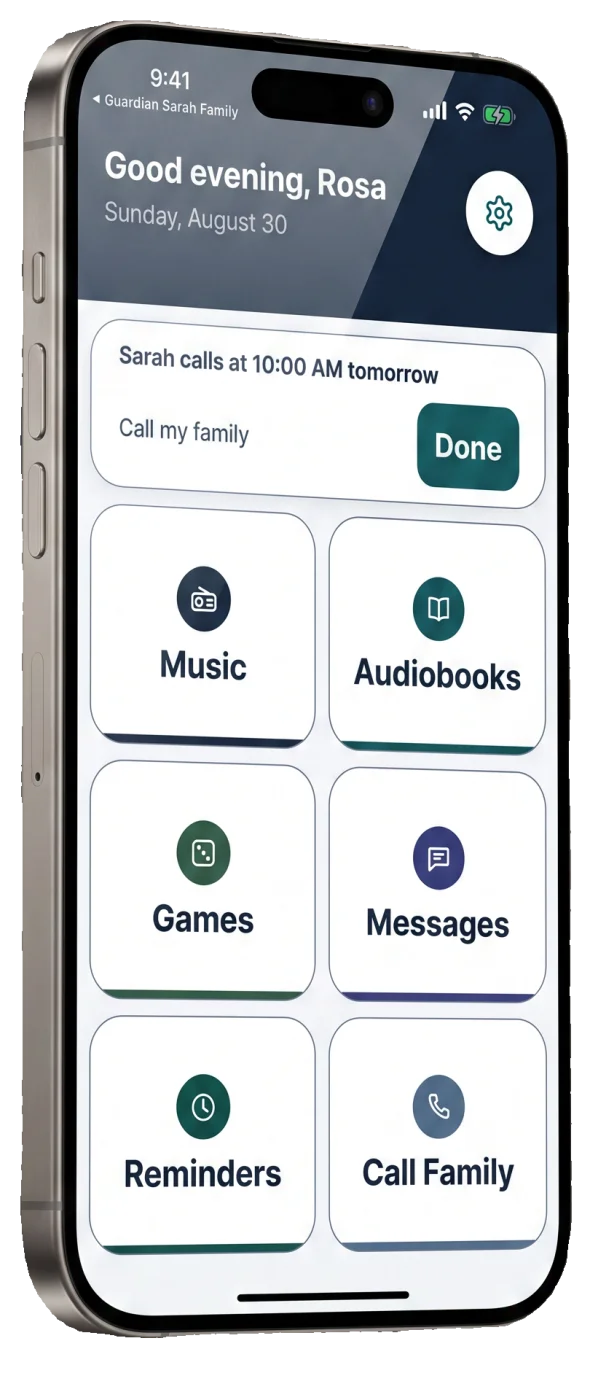
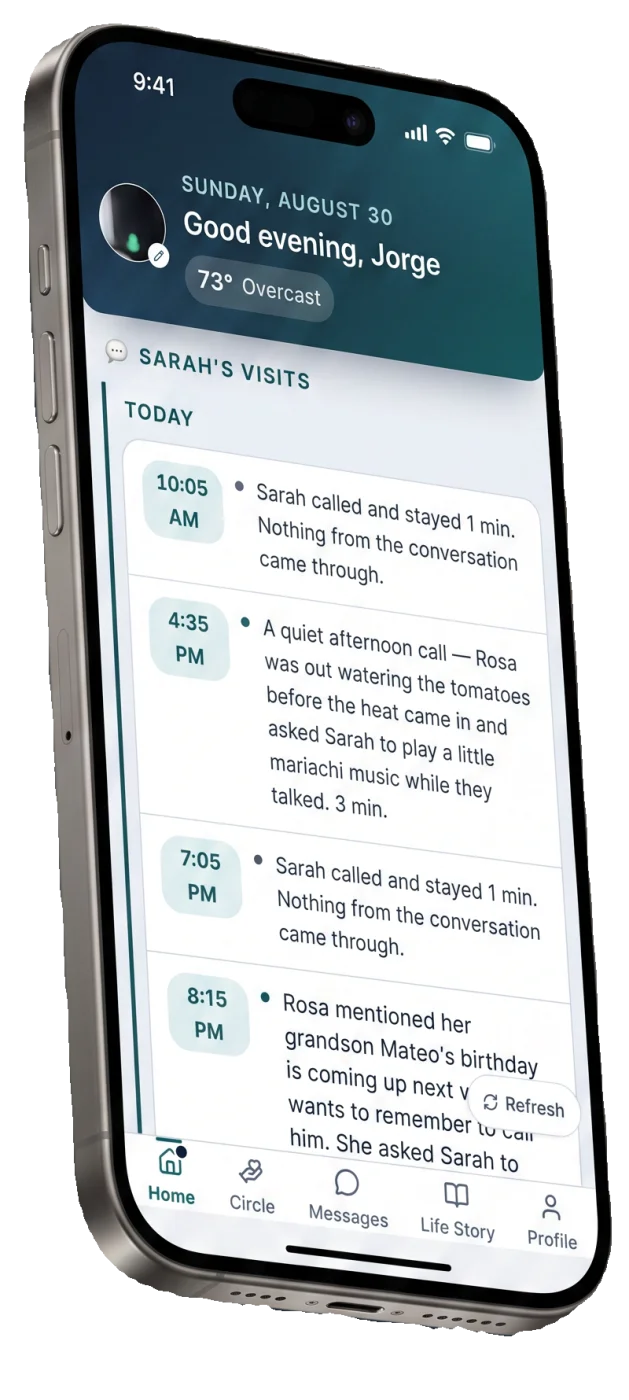
The senior app
Simple buttons. Clear voice. No fuss.
It goes on the phone you already own. Big buttons, nothing to manage, no accounts to keep track of. Sarah visits up to three times a day — morning, afternoon and evening — and next time she remembers what you said.
-
Talk To Sarah
Your phone rings the way it always does and you answer it the way you always do. She tells you what day it is — and what the weather is doing, once your family has added your town — asks how you slept, and wants to hear about your day. There is nothing to learn.
-
Your Life Story
The stories your family loves are the easiest to lose. Sarah asks about your life one gentle question a visit, across eight chapters from childhood to today — where you met your spouse, what your mother's kitchen smelled like. She builds each story over a few visits, and each one becomes a page of your life story in your own words. When recording is on, the page carries a clip of you telling it. Your family watches the book fill in, and the Family Admin keeps the book and the clips, even after the subscription ends. It is yours: skip any question you'd rather not answer, and write to support@guardiansarah.com to have any entry taken out, or all of it gone at once.
-
Music, Radio, Scripture, Audiobooks
Big buttons on your home screen: your station, classical music, an audiobook, the Bible or the Qur'an. One tap and it plays. No limit, no extra charge, no accounts to manage.
-
Games
Solitaire and a daily word game, made gentler: big cards, no timers, no losing. A quiet way to pass twenty minutes between visits.
-
Reminders
Short, calm reminders for the things you want to remember. Tell her about Thursday's appointment or your grandson's birthday and she will bring it up. You choose what she reminds you about, and so can the family you invited.
The family app
A quiet way to stay close, without intruding.
A second app, for you and the rest of the family. Read how each call went, see what they asked for and who is bringing it, send a note Sarah reads aloud, and watch their life story fill in. Your parent sets up their own account and invites you into it — and they can have your access ended at any time by asking us. You never see a live call and you are never sent an alert.
-
Recap
A short summary after each of Sarah's visits: what they talked about, how they seemed, how long they spoke. A few warm sentences about the neighbor's dog or the story they told — not a health report, and nothing in it to score or track.
-
What They Asked For
If your parent mentions they are out of something — toothpaste, stamps, a birthday cake for Sunday — it lands on a little list in your app, waiting for whoever visits next. No alert, no urgency. You see it when you open the app, tap "I can bring this", and it is handled. The same goes for a message they give Sarah for you: she notes it, and it is waiting the next time you open the app.
-
Notes
Leave simple notes for Sarah to read aloud — appointments, reminders, encouragement. She opens with "A message from your family…" No app for them to open, no button for them to find.
-
Their Life Story
Too many family stories are lost too soon: how they met, the town they grew up in, the first job, the bad winter. Sarah asks about their life one question a visit, across eight chapters from childhood to today. Sarah builds each story over several calls, and each one becomes a page retold in their own words — with a clip of them telling it, when recording is on. You watch the book fill in, chapter by chapter, and the Family Admin keeps the book and the clips, even after the subscription ends. You can share a story with the rest of the family by link. Your parent decides what to tell her and can skip any question; anything already saved can be removed here by the family admin, or by asking us.
-
What You Will Never Get
No live listening. No "she sounded off today". Sarah is not a safety service — if a visit is missed, the app simply shows it the next time you look, and nobody is paged. No alerts of any kind — nothing routine, and nothing urgent either. If something is wrong, call 911 — Sarah cannot.
Three steps, and no hardware for anyone.
Download The App
The senior app for the older adult, on the smartphone they already own — an iPhone or Android phone, not a landline or a flip phone. The family app for the adult child. Both are free to install.
Add Your Information
Name, phone, and the family member you want connected. The person who is going to use it sets up their own account — we will not start it for someone who has not agreed to it.
Start Talking
Sarah is ready right away. No payment needed to begin, and no card to enter.
14 days free
Every feature included. Subscribe in the app through Apple or Google and the first 14 days are free — nothing charged until day 15.
Then $39.99 a month
Or $399.99 a year, which is about two months free. No setup fee and no other fees. Either the older adult or a family member can pay, in the app, through Apple or Google. Cancel any time.
One product and one price. There will never be a special offer or a deadline. See the price and terms in full.
What we promise
No Cameras
Sarah never sees you. She is voice only, her microphone is open during your call and never between calls, and Sarah records your calls and says so out loud at the start of every call. You can ask us to turn recording off.
You Decide
You choose what she can do, who joins your family circle, and what they see. Delete a recording at any time; to delete everything at once, ask us and we do it. To remove someone, ask us and we cut their access. Cancel any time.
Not Medical
No live listening. No "she sounded off today". Sarah is not a medical device and not a safety device — she cannot detect a fall and cannot call anyone for you. In an emergency, call 911. In a crisis, call or text 988.
She's An AI
Sarah is a computer voice, not a real person. She says so on your first call, and again any time you ask. She will never claim to be human.
If this is the week you are having.
- When an elderly parent calls multiple times a day — or stops answering altogether. They look like opposite problems.
- The guilt about not calling Mom enough — two feelings arrive together, and only one of them has a fix.
- What does my elderly mother do all day? — and why "she says she's fine" is not an answer.
Guardian Sarah, your questions answered.
Read every question on its own page →
What is Guardian Sarah?
Do I need to download an app, or does Sarah just call my phone?
Is Sarah a real person?
Does she sound robotic?
Is this a medical or safety device?
Are my calls recorded?
What does my family see?
What does it cost, and how do I cancel?
My parent isn't good with technology. Can I set it up for them?
Write to a person before you talk to Sarah.
One of the two of us reads it — not a queue, not a bot. Ask anything, including what it costs and how to stop it.
Family-owned in Madison, Wisconsin. Write, and one of us answers.